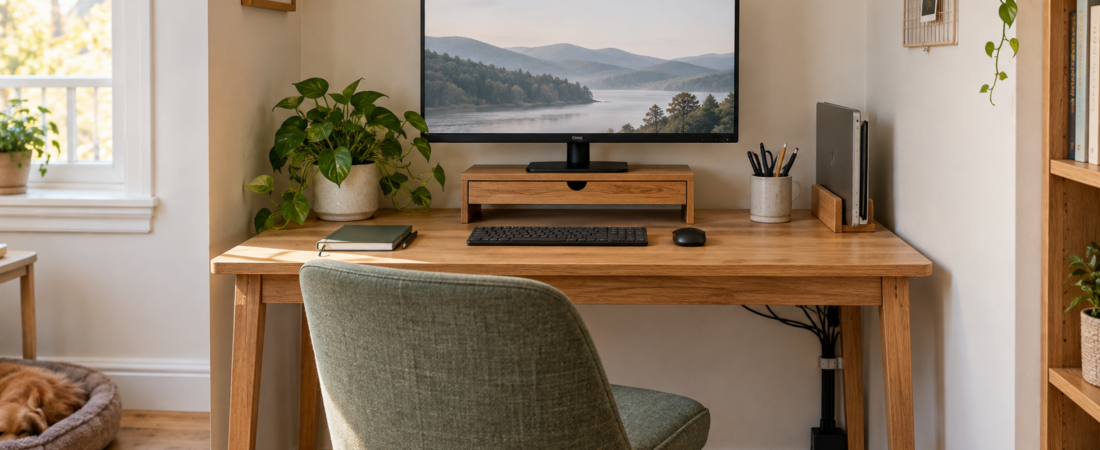
If your keyboard or notebook barely fits on the desk, look at what is taking up the rest of the surface. Move occasional items out of the way, give daily tools an easy place to go back to, and deal with the cords and devices that occupy working space.
The seven upgrades below include two resets that cost nothing and five researched products. Try the free changes first. Measure your desk before buying, and add a product only for a problem that keeps coming back.
How we chose these small-office upgrades
We looked at ways to free working space, then reviewed the products’ current manufacturer listings, dimensions, installation limits and substantial patterns in owner feedback. Where possible, we chose adjustable or no-drill designs for renters and small spaces. These are researched picks, not hands-on tests. Read more about how we choose recommendations.
Quick overview
| Upgrade | Best for | Check first |
|---|---|---|
| Clear one working zone | Desks that collect unrelated items | The space your keyboard, notebook, or project really needs |
| Vertical laptop stand | One or two closed laptops | Device thickness and connected cables |
| Monitor riser with drawer | Using vertical space above the desk | Monitor footprint, weight, and viewing height |
| Clamp-on cable tray | Power strips and cords under the desk | Desktop thickness and edge clearance |
| Clamp-on under-desk drawer | Paper and supplies without a pedestal | Knee room, desk supports, and lift mechanisms |
| Compact desktop organizer | A small set of daily tools | What you use every workday |
| One-minute closing routine | Keeping the system usable | A realistic home for every daily item |
1. Clear one working zone before buying anything
Best for: a desk that becomes storage between work sessions.
Clear the part of the desk you use for work. That might be the area in front of the keyboard, or enough room for an open notebook and one reference page. Move mail, chargers, backup supplies and household items out of that space.
Keep anything unrelated to the task outside that area. The rest of the desk does not have to be empty. Try this for a few days before buying an organizer, then look at what still collects there to see whether you need storage at all.
2. Store a closed laptop vertically
Our pick: OMOTON Dual Vertical Desktop Laptop Stand.
A vertical stand can hold two closed laptops upright, taking them out of a wide stack on the desk. According to the current listing, OMOTON’s dual-slot aluminum stand adjusts for devices roughly 0.55 to 1.65 inches thick. Silicone at the contact points helps reduce slipping and scratches.
Best for: households that dock a laptop to a monitor, alternate between work and personal computers, or need to park a closed device at the end of the day.
Watch for: Measure the laptop with any protective case attached. Leave space for ventilation, and do not force a device into a slot that presses on the screen or ports. If a charging cable stays connected, make sure it can exit without a sharp bend.
Check the current price on Amazon →
3. Raise the monitor and use the space underneath
Our pick: Klearlook Foldable Monitor Stand With Drawer.
A monitor riser can use the space above the desk without increasing the desk’s footprint. Klearlook lists three width settings—16.5, 18.5, and 20.5 inches—plus a shallow drawer and a slot for a phone or tablet. You can tuck a keyboard underneath when you need the surface for writing or crafts.
Best for: a monitor base taking up the center of the desk, plus small tools you want to keep in a shallow drawer within reach.
Watch for: Check whether the screen will be comfortable to view at the raised height. Compare the monitor’s footprint and weight with the current listing, then test your viewing position. Measure the keyboard’s full width and height if you plan to slide it underneath.
Check the current price on Amazon →
4. Move the power strip and cable slack below the desk
Our pick: Cinati No-Drill Under-Desk Cable Management Tray.
A tray under the desk can lift cable slack off the floor. Cinati’s metal tray clamps to the desktop without screws. The current listing gives a tray size of about 13.4 by 4.6 by 3.1 inches and a compatible desktop-thickness range of about 0.4 to 2.4 inches.
Best for: lifting a compact power strip, charging bricks, and excess cable length off the floor while keeping them reachable.
Watch for: Confirm that the clamp has a flat section of desk edge to grip. Route cords with enough slack for a sit-stand desk, movable monitor arm, or laptop that is unplugged regularly. Do not overload a tray or coil hot power adapters tightly together.
Check the current price on Amazon →
5. Put small supplies in an under-desk drawer
Our pick: Homeify Clamp-On Under-Desk Drawer Organizer.
Without a built-in drawer, small supplies can end up staying on the desktop. Homeify’s two-drawer mesh organizer clamps below the work surface without drilling. The listed overall dimensions are about 18.5 by 12 by 4.5 inches. It is better suited to a desk with open space underneath than to a very narrow writing table.
Best for: paper, a notebook, headphones, and a modest supply of office tools that need to stay close without occupying the desktop.
Watch for: The listing gives a desktop-thickness range of 0.25 to 1.75 inches. Desks with a center support bar or motorized lift mechanism are not compatible; the maker recommends installation at the desk ends. Before ordering, sit at the desk and check the knee clearance so the drawer will not crowd your legs.
Check the current price on Amazon →
6. Give daily tools one compact home
Our pick: BLUE GINKGO Compact Desk Organizer.
Linked variant: Compact, Blue. Confirm the selected color and current options on Amazon.
Choose the daily tools you want to keep on the desk before adding a caddy. This BLUE GINKGO model has five upright compartments, a shallow tray and a half-depth drawer. The listed footprint is approximately 4.9 by 7.5 inches, which may suit a small desk better than a wide multi-tier file station.
Best for: a few pens, scissors, sticky notes, a charging cable, and the small items you keep finding across the work surface.
Watch for: Decide what will go in it before buying. Store backup pens, spare cables and rarely used tools elsewhere. Keep the open organizer to a small daily set if you want it to save time.
Check the current price on Amazon →
7. End with a one-minute closing routine
Best for: keeping a shared room or multipurpose desk ready for the next day.
At the end of a work session, close the laptop, put daily tools back in the caddy or drawer, return the current notebook to the same spot, and take away cups or household items. This should take about a minute. If you have to sort several containers, simplify the setup so it is easy to reset.
Use one small inbox away from the keyboard for papers and items that need a decision later. Empty it on a set day so they do not spread across the desk.
Before you buy
- Measure the desk’s usable surface, edge thickness, underside clearance, and knee space.
- Check for support bars, drawers, wall obstructions, and sit-stand mechanisms.
- List exactly what each organizer will hold before choosing its size.
- Confirm the current Amazon dimensions, materials, price, and availability.
- Add one upgrade at a time and remove any organizer that creates a new obstacle.
Keep the work area clear
Clear a working area and get into the habit of putting things back when you finish. If the same devices, cables or tools keep taking over, use vertical or under-desk storage for those items. For more ideas, explore our Home Office guides and Small Spaces.